Solitaire - Classic Card Game
- 4.8
- Rating
- 5.00M
- Installs
- Free
- Price
 Analysis by App-foxy
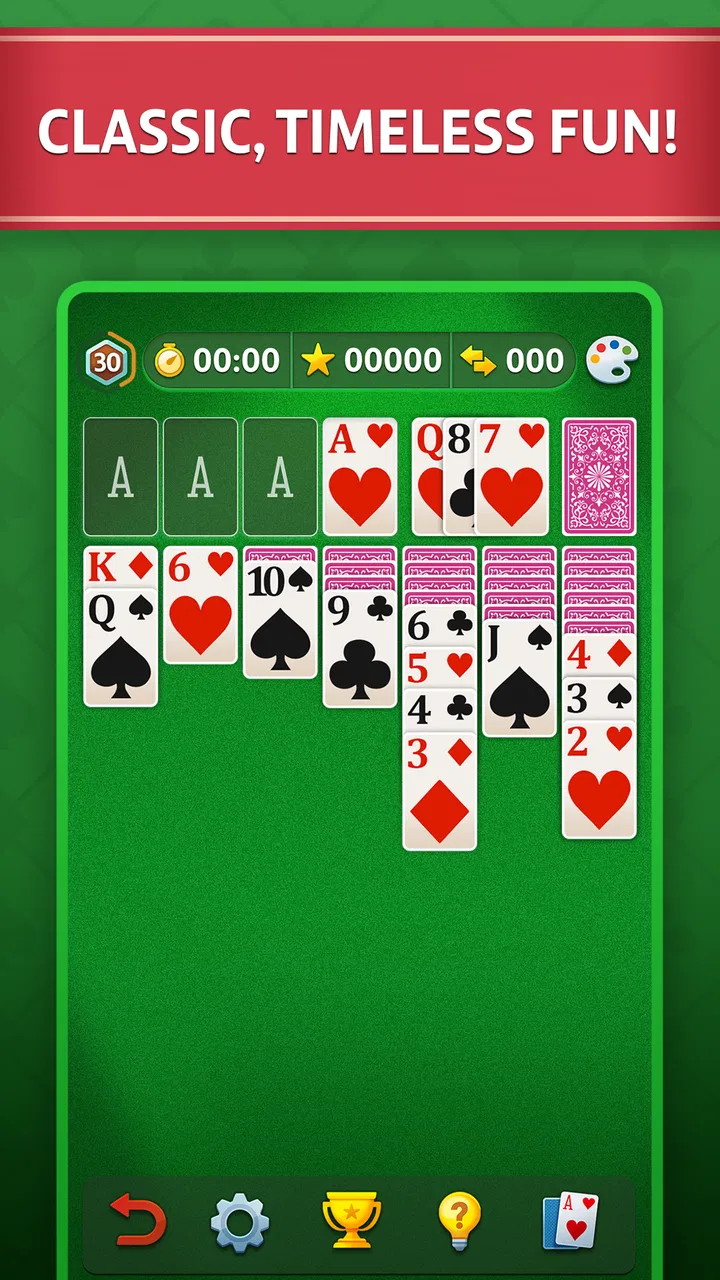
Solitaire - Classic Card Game is the kind of mobile game I open when I want something familiar, quiet, and easy to start without learning a new system. It is a card game built around the traditional Klondike format, with a layout that gives the cards plenty of room on the screen. I found that simple presentation important: the game is less about decoration and more about seeing the tableau clearly, making a move, and deciding whether the next card is worth exposing.
The game is free to download, and it comes from DNA Mobile Group. It is listed for Everyone, so it is a reasonable choice for a shared family tablet or for someone who wants a straightforward card game without an age-specific theme. Its average rating is 4.8 from around 70 thousand ratings, and it has passed 5 million installs, which fits my impression that this is designed for broad, everyday use rather than a small specialist audience.
How I play a normal session
My usual session starts with a quick scan of the tableau rather than immediately tapping the first legal move. In Klondike, a move can be legal and still be unhelpful. I look first for opportunities to uncover a face-down card, create an empty column, or move a low card to a foundation without blocking a more useful sequence. That habit matters more here than speed, especially when the screen is filled with several possible moves.
You May Also Like

 AccuWeather: Weather Radar
AccuWeather Review: A Quick, Clear Forecast for Everyday Decisions
For everyday plans, the best forecast is the one you can understand quickly. AccuWeather makes rain timing, radar, and local conditions easy to act on, with a few trade-offs.

 Hill Climb Racing
Why Hill Climb Racing Still Turns Crashes Into One More Run
A tiny car, a bumpy hill and one more upgrade: Hill Climb Racing keeps resurfacing because its simple chaos makes every near-miss feel personal.

 AliExpress - Shopping App
AliExpress Makes Global Shopping Feel Personal, but Shoppers Bear the Risk
AliExpress turns a global marketplace into a pocket-sized discovery engine. Its reach is useful, its shopping loop compelling, and its trade-offs easy to miss.

 Lords Mobile: Kingdom Wars
Lords Mobile Is a Kingdom-Building Routine, Not a Quick Match
A case-by-case verdict on the building, battles, device demands, and social commitments that make Lords Mobile rewarding for some players and exhausting for others.

 PDF Scanner app - TapScanner
TapScanner Makes Paperwork Easier to Capture, Check, and Share
TapScanner makes scanning with a phone feel less like a rescue operation and more like a dependable step in getting work done. Its capture tools are useful, though not flawless.

 Block Blast!
 Shows How Much a Puzzle Game Can Leave Out
A quiet grid game shows why puzzle players increasingly value instant clarity, repeatable skill and low-pressure play—and where the genre still needs to catch up.
More From Our News Desk
View All News


The large-card presentation is the strongest practical choice in the game. Cards are easier to distinguish at a glance, and I do not need to lean close to the phone when the layout becomes busy. This also helps when I play one-handed during a short break. I can see the suits and ranks without the interface feeling cramped, although the larger cards naturally leave less room for extra visual information around the board.
A typical round works well in small pieces. I might play for a few minutes while waiting for an appointment, stop after reaching an awkward position, and return later when I have enough attention to think through the next sequence. That makes it more useful to me than a card game that expects a long uninterrupted session. It also means the game suits people who enjoy a calm mental reset rather than constant rewards or competitive pressure.
For new players, I recommend focusing on the tableau before worrying about perfect play. Move cards only when the destination improves access or organization. A red eight placed on a black nine may be legal, but if that move prevents another card from being turned over, it may be better to wait. I found this simple rule more useful than trying to memorize every possible strategy on the first day.
Small decisions that improve the opening
At the beginning of a deal, I check whether the stock or waste can help reveal a hidden card before committing to a long sequence. I also avoid filling an empty column too quickly. An empty space is valuable because it can receive a king and then hold a long descending stack, but using it without a clear plan can make the board harder to manage.
Another useful habit is to delay foundation moves when the same card could still help the tableau. Sending a low card upward feels like progress, but a card in the foundation is no longer available for alternating-color arrangements. I normally move cards to the foundation when doing so opens a column, clears a useful rank, or removes a card that has no realistic role in the tableau.
These choices are easy to make with large cards because I can compare several columns without losing track of the suits. The game does not turn Klondike into a puzzle with a new identity; instead, it gives the traditional structure a comfortable mobile layout. That is exactly why I could recommend it to someone who wants classic solitaire rather than a heavily themed card adventure.
Settings and habits worth checking
Before settling into regular play, I would spend a minute looking through the available settings and controls. The most useful adjustments in any solitaire app are the ones that reduce accidental taps and make the board comfortable to read. In this game, I pay particular attention to how cards are selected and moved, whether a tap can complete an obvious move, and whether the visual layout remains comfortable on my particular screen.
I prefer a control style that lets me tap a card and then tap its destination when the board is crowded. Dragging feels natural for a short stack, but it can become awkward when I am using one hand or when the phone is resting on a table. If the game offers more than one interaction method on my device, I choose based on the type of deal: tapping is safer for precise moves, while dragging can feel quicker when moving a clearly separated sequence.
It is also worth checking the sound and visual feedback before playing in public. A quiet game should stay quiet when I open it in a waiting room or during a commute. Turning off distracting audio, when that option is available, lets me concentrate on the card structure instead of treating every move as an event. I would not call this a major feature, but it changes whether the game feels relaxing or slightly intrusive.
Screen size affects the experience more than I expected. On a larger phone or tablet, the large cards make the whole tableau easy to read. On a smaller display, the same design can make the lower part of the board feel dense, particularly when several descending stacks overlap. I find that rotating the device or changing the display setting, if supported by the device, can be more useful than trying to play faster.
Because the current version is 28.5.2 and the minimum operating system is Android 9, I would check compatibility before installing on an older Android phone. That requirement is not especially demanding for many users, but it matters if the device has been kept for years or is used as a basic family handset. The game is free, while in-app purchases range from $0.99 to $19.99 per item, so I would also review the purchase controls if a child may use the device.
A repeatable routine for short sessions
My most reliable routine is simple. I begin with one scan of every column, identify the moves that uncover face-down cards, and avoid making foundation moves just because they are available. After each important move, I pause and rescan the tableau instead of following the original plan. This prevents a common mistake in solitaire: assuming that a promising sequence will remain useful after the board changes.
When I need to stop, I try to leave the game in a position I can understand later. I do not make a random move simply to finish on a card. If I am playing during a short break, I prefer ending after a clear decision point, such as exposing a new card or opening a column. When I return, I can immediately see what the next problem is rather than reconstructing a messy chain of taps.
This routine is particularly helpful for casual players who do not want to study formal Klondike theory. It creates structure without turning a relaxing game into homework. I can play instinctively, but the repeated scan-and-pause habit gradually improves the quality of my decisions.
Faster patterns without careless play
Experienced solitaire players often look fast because they recognize patterns before touching the screen. I found that the best shortcut is not tapping quickly; it is reducing unnecessary decisions. If a card can move to only one sensible place, I handle it immediately. If two moves appear equally safe, I choose the one that reveals more information. This keeps the game moving while preserving flexibility.
One pattern I watch for is a sequence that can be moved as a unit without hiding a valuable card. Moving a complete alternating-color stack can open a column or expose the card beneath it. However, I avoid transferring a long stack merely because the destination is legal. The move should either improve access or create a useful empty space. Otherwise, I have only changed the location of the problem.
I also separate “progress” from “activity.” Turning over a face-down card is usually meaningful progress. Moving a visible card between two columns may be useful, but it can also be busywork. When I want a faster round, I ask whether a move changes the number of available options. If it does not, I wait and examine the stock or another column first.
Foundation timing is another place where experienced habits help. I move cards upward in a controlled way, especially when a tableau arrangement still needs a particular low card. Sending every available ace and two to the foundation can make the board look tidy while quietly removing the cards needed to build sequences. I prefer a foundation move when it clears a column, frees a buried card, or is unlikely to be needed for alternating colors.
When the stock offers several choices, I try to remember the order of cards that may become available later. I do not need a written record for ordinary deals; a quick mental note about a useful black queen or red seven is enough. This is one of the few ways to make the game feel deeper without adding complexity. The large cards help because I can quickly identify the card I am waiting for when it appears again in the cycle.
Using the game as a daily focus break
The most realistic use case for me is a ten-minute break between tasks. I can open the game, play a few deliberate moves, and stop without needing to maintain a social match or follow a story. That makes it a better fit than competitive card games when I want to reset my attention. It is also less demanding than a strategy game that requires remembering a campaign, inventory, or long-term objective.
It works well for older relatives too, provided the device meets the operating-system requirement and the screen is comfortable. The familiar rules reduce the learning barrier, while the large cards make the layout easier to follow than many compact solitaire alternatives. I would still set up the phone so accidental purchases are protected, since the game includes optional in-app items despite being free to start.
For commuting, I like that a round can be played in fragments. The limitation is that solitaire is not ideal when attention must remain on surroundings. I would not use it while walking, cycling, or doing anything that requires quick awareness. Its best setting is a chair, a waiting area, or a quiet evening at home where I can concentrate for a few minutes.
Where the classic format reaches its limits
The same simplicity that makes this game approachable can make it feel plain to players who expect a larger game system. If I want daily missions, animated effects, competitive leaderboards, or a strong progression loop, this is not the first option I would choose. Its appeal comes from the card layout and the familiar decisions, not from a large collection of modes or a dramatic presentation.
There is also a strategic limit built into traditional Klondike. Some deals can feel more satisfying than others, and even good decisions cannot always create a win from an unfavorable arrangement. That uncertainty is part of the classic format, but players who want tightly balanced puzzles may prefer a solitaire variant with deliberately designed challenges. This game is better for repeated casual play than for guaranteed, carefully tuned problem-solving.
Large cards are helpful, but they do not solve every usability issue. On a small phone, overlapping columns can still require careful tapping, especially when I am trying to select a card near the bottom of a stack. A tablet improves readability, while a very small display can make the experience feel slower because I double-check every move. I would choose a different app if my priority were the smallest possible interface or a highly customizable visual theme.
The free entry point is convenient, but the presence of in-app purchases means I would not treat the game as completely outside the purchase ecosystem. Someone who wants a one-time purchase with no optional spending should compare the payment model before committing. For me, this is a minor consideration rather than a reason to avoid the game, but it is relevant for family devices and tightly controlled budgets.
Compared with playing physical cards, the app removes setup, shuffling, and the need for a clear table. That is its biggest advantage. Compared with a browser version, it feels more convenient for a dedicated phone session, although a browser may be preferable if I do not want another game installed. Compared with more elaborate solitaire apps, this one is easier to understand but may offer less variety for someone who quickly tires of standard Klondike.
Who should choose it
I would recommend it to someone who wants a recognizable solitaire experience, readable cards, and short sessions that can begin immediately. It is especially suitable for beginners, occasional players, and people who enjoy improving through small decisions rather than chasing a complicated reward system. The Everyone rating also makes it a broadly approachable choice, although device purchase controls are still sensible.
I would point a serious solitaire student toward it if the goal is practicing board awareness, foundation timing, and efficient sequencing. The game provides enough repetition for those habits to develop. I would not choose it for a player whose main interest is multiplayer competition, unusual card variants, elaborate customization, or a deep progression system. In those cases, a different category of card app would be a better match.
My final view after building a routine
After using Solitaire - Classic Card Game as a regular short-break game, I see its value in its restraint. DNA Mobile Group has kept the focus on the Klondike board, and the large-card layout makes that focus practical on a phone. The game is free, familiar, and easy to return to, while the optional purchases are the main detail I would keep in mind before handing the device to someone else.
The best experience comes from combining the comfortable presentation with disciplined habits: scan before moving, protect empty columns, delay foundation cards when they still have tableau value, and rescan after every meaningful change. Those habits make the rounds more interesting without pretending that every deal can be solved through speed alone.
My recommendation is straightforward: choose it if you want a dependable classic card game for quiet, repeatable sessions. Skip it if you need competitive play, a wide selection of variants, or a heavily customized game environment. For everyone else, Solitaire - Classic Card Game is a polished way to keep the traditional puzzle close at hand, with enough room for thoughtful play and very little friction between opening the app and dealing the cards.
FAQs for Solitaire - Classic Card Game
01What makes Solitaire - Classic Card Game different from other solitaire apps?
Solitaire - Classic Card Game offers a seamless and user-friendly experience with customizable themes, daily challenges, and an intuitive interface. Unlike many other apps, it includes a unique scoring system and detailed statistics to track your progress. It's also optimized for both phones and tablets, ensuring smooth gameplay.
02Is Solitaire - Classic Card Game free to play, or are there in-app purchases?
The app is free to download and play, with optional in-app purchases available. These purchases include ad-free experiences and access to premium themes. While the basic game is enjoyable without spending money, the purchases can enhance the overall experience for dedicated players.
03Does Solitaire - Classic Card Game require an internet connection to play?
No, Solitaire - Classic Card Game can be played offline, making it perfect for travel or situations without internet access. However, connecting to the internet allows you to access daily challenges and leaderboards, providing additional ways to enjoy the game.
04What devices are compatible with Solitaire - Classic Card Game?
The game is compatible with most Android and iOS devices, supporting both older and newer models. It's optimized for a wide range of screen sizes, ensuring clear graphics and responsive controls on smartphones and tablets alike. Always check the specific app store requirements for compatibility.
05How can I track my progress in Solitaire - Classic Card Game?
The app includes detailed statistics that track your wins, losses, and best scores. You can view your progress over time and compare your performance with others through leaderboards. This feature encourages improvement and adds a competitive edge to the classic card game.
Pros
- Simple and intuitive controls.
- Classic solitaire experience.
- Offline mode available.
- Customizable card designs.
- Smooth and fast performance.
Cons
- Contains ads during play.
- No multiplayer option.
- Limited theme variety.
- In-app purchases for extras.
- Requires periodic updates.

Solitaire - Classic Card Game
Gallery